
- Developer
- cargames.com
- Devices
- Desktop, phone and tablet
- Category
- Simulation
- On Browser Game Hub
- Play here
The player loads automatically on this page. The provider controls the in-game menu and any ads shown in the player.
Game overview
Click Start and No, thanks on the optional skin offer. W drives the opening excavator and D turns it to the right. We reached the striped crossing at the junction.
Watch gameplay
Drive the excavator from the field to the junction
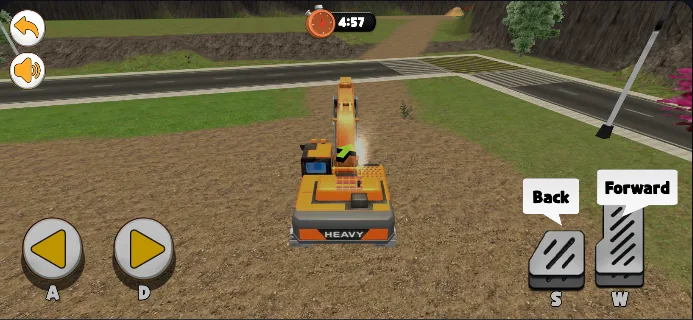
The A and D steering buttons appear on the left. Check the drive labels and hold W
After skipping the optional skin, find Forward over W and Back over S on the right. Hold W to leave the starting field.
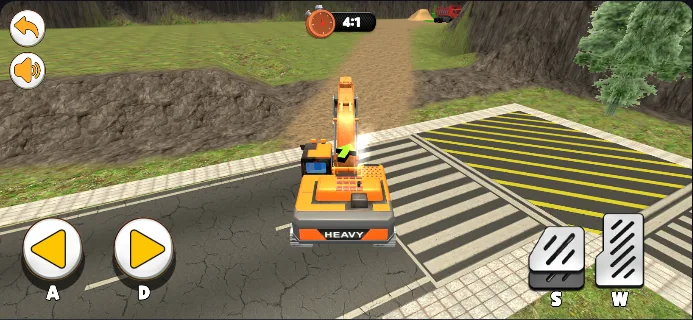
The crossed road markings give you a fixed comparison for the turn. Approach the stripes and adjust with D
Continue toward the road. A short D input shifted the excavator and its camera to the right near the crossing.
Stop at the edge of the crossing long enough to see the route and the room the base needs to turn.
Position the vehicle before using the bucket
Find the crossing before you try the arm
The opening machine starts on the field facing the road. W takes it forward. Use the crossing markings to see how the view and base change on a short D input. Hold W on the straight while the markings are ahead, then release before you're right up on them to check your angle.
More work-site and vehicle practice


Frequently asked questions
Which keys move the chassis?
At the opening, W is Forward and S is Back. A and D match the left and right buttons.
The pictured controls are for driving to the job site. We drove across the field and turned at the junction. For a different machine or a bucket task, read the new labels before repeating the travel inputs.
How do I avoid overshooting a truck or fill area?
At the work site, line up the base first. Then use smaller arm movements and pause over the receiving area before lowering.
Read the current job to see where material has to go. The game guide describes excavating, hauling and filling as separate tasks. Watch the bucket against the edge of the truck bed or marked area to judge how much farther it needs to move. Digging and placing a load were outside the desktop test.
What tells me the first steering input worked?
Compare the excavator against the crossing stripes. In the first capture the machine is still on the field, then the stripes and road are under the front in the second view.
At the junction, release W and use one short D input. The camera turns with the machine, so use the stripe direction as a reference to see how much the base has moved. The timer is still running, which tells you time has passed even if the machine is temporarily stopped.
How can I avoid driving around with a load held too low?
Before travelling or swinging toward the destination, lift the bucket clear of the ground as the game guide describes. Keep the target in view as you move.
Watch the bucket relative to the soil pile first, then the receiving point. When working with a dump truck or crane in a later job, read the changed controls before moving the load. Approach and placement use different feedback, just as arriving at the striped junction and finishing a digging job are separate.
How do I use the excavator controls on a phone?
Tap the controls in the game view, then watch the arm and bucket to see which part each action moves.
Why does moving the excavator over the pile not finish the job?
A job may require transferring material or filling a foundation. Check the current target and move the load to the place the job calls for.
Do all jobs use the same excavator?
The game also features other vehicles and cranes. Check the active equipment and its on-screen controls when you start a new task.








Find another game to play
Explore more racing, puzzle, and sports games, or pick one at random.


