
Zana Lab
- Developer
- torumitch
- Devices
- Web browser · desktop tested
- Category
- Fighting
- On Browser Game Hub
- Game guide
https://typefighter2.com/
Game guide
Type Fighter II turns keystrokes into moves. Start in the First Steps Dojo to practise F and J. Follow the highlighted prompt until the streak reaches 8/8.
Jump to How to reach the First Steps Dojo · How to clear Find the Keys without dropping the streak · What changes after Find Complete · Take the Dojo branch at 1-1
How to reach the First Steps Dojo
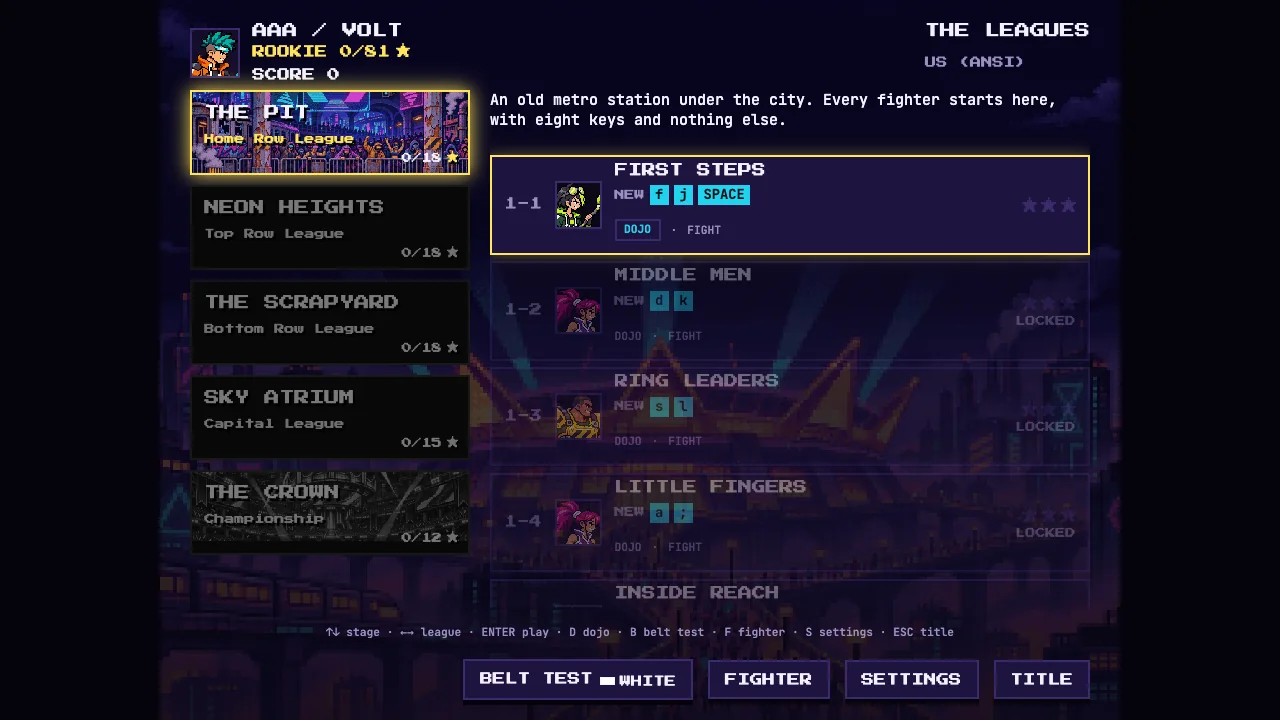
- Press a key to leave DEMO on torumitch’s original Type Fighter II. Choose Start and pick a fighter. We chose Volt.
- When Mavis offers the Belt Test, choose Not Now to go to The Pit.
- Find 1-1 First Steps and select Dojo. Fight is a separate button on the same level. Return to the level picker if you opened that one by mistake.
How to clear Find the Keys without dropping the streak
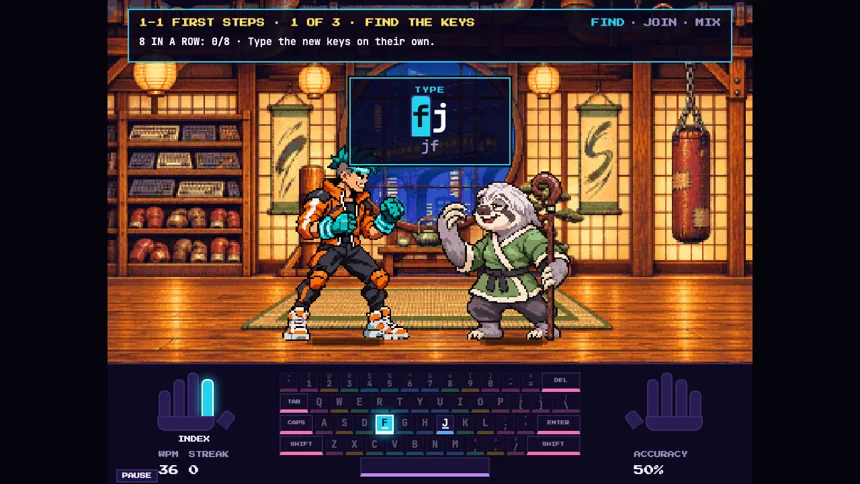
Put your index fingers on F and J and follow the key that is lit. Our prompts came in the order fj, jf, fj, jf. The space between pairs on screen helps you read them. Save the space bar for the next exercise.
I tried an extra letter and some spaces and saw accuracy drop to 50% while the streak stayed at 0/8. It moved again once I followed the highlighted letter. Feel for the ridges on F and J so you can keep your eyes on the next prompt.
What changes after Find Complete
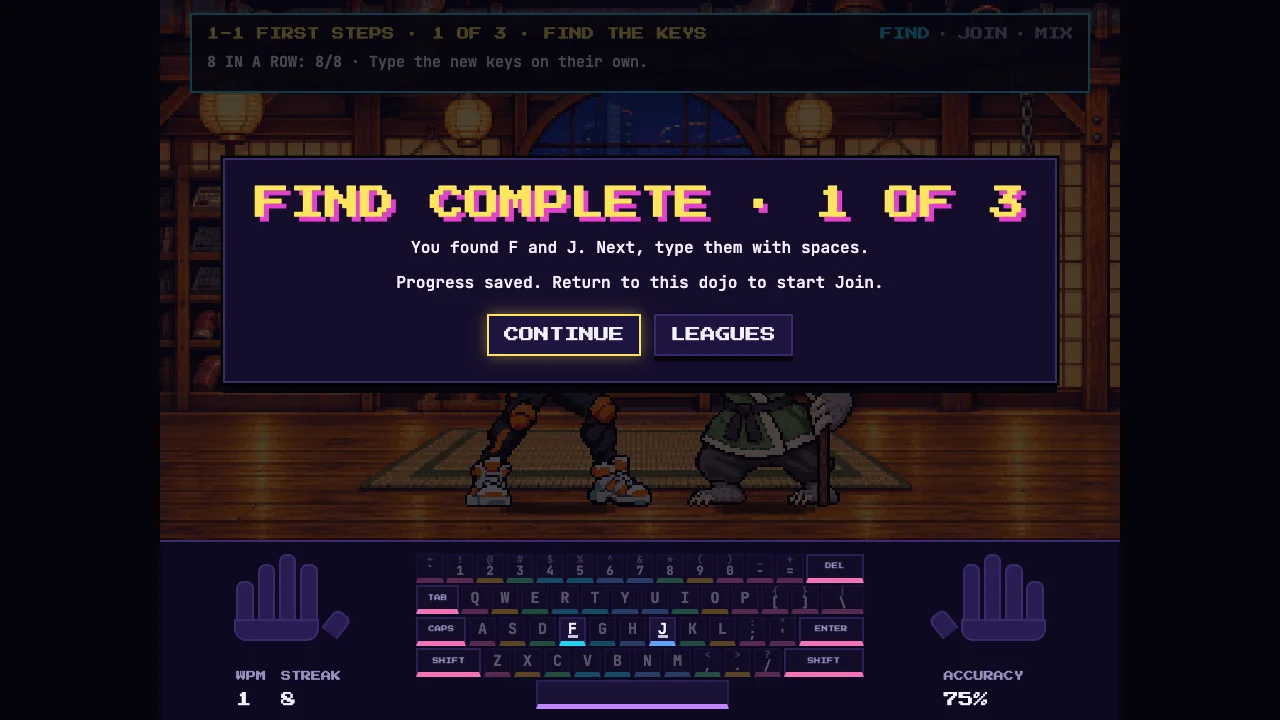
After eight clean keys the game showed Find Complete and 1 of 3. The save message said a return to this dojo starts at Join.
You can select Continue right away. If you come back later, look below FIRST STEPS to see which exercise is open. Start including the spaces once the Join prompt asks for them.
Take the Dojo branch at 1-1
The Dojo keeps three traces of what you just did. The key over Volt tells you what comes next. The keyboard below shows where it sits. Accuracy and the streak tell you how the last input went.
Recover from a broken streak
The accuracy readout dropped to 50% and the streak was still zero. The drill was waiting for the highlighted F. Looking at that letter instead of the accuracy was enough to start moving again.
What the first 8/8 unlocks
Our displayed sequence was fj, jf, fj, jf. Eight clean letters brought up Find Complete and 1 of 3. Continue leads into the exercise that uses spaces. We could reach the drill in a narrow touch browser. We completed those eight inputs on a physical keyboard. Look for Type Fighter II by torumitch to get the version with Volt and The Pit.
Come back to Join after a break
The completion panel tells you which stage comes next. I’d use that stage name to pick up the lesson later. It lets you tell at a glance whether it saved or opened a fresh drill.
How Type Fighter II compares with two browser fighters
Start with the Dojo if you want to practise typing. Choose one of these games if you came for a short fight or a boxing match.

Sources and playtest
24 November test in desktop Chrome with US ANSI on the course, and touch emulation at 390 pixels. We cleared the first part of Dojo 1-1.
- Official Type Fighter II game
- Developer’s Show HN and keyboard advice
Frequently asked questions
Should I take Mavis’s Belt Test on my first visit?
Choose Not Now if you want to start with the lessons. Open The Pit, select 1-1 First Steps, then choose Dojo. Mavis describes the Belt Test as a way to skip lessons for keys you already know and go on to their fights. Start in the Dojo if you’re still finding F and J by feel.
The screen says fj. Which key does it want right now?
Look at the highlighted letter under TYPE. For fj, press F and then J. A line labeled Next prompt can already show jf, which comes after the current pair. Space can advance Mavis’s dialogue, but during Find the game is waiting for the highlighted letter. Leave spaces out until the next exercise asks for them.
Why does my streak stay at 0/8 when I can type F and J?
Pause and press only the letter that’s lit. I tried an extra letter and some spaces. Accuracy dropped to 50%, the streak stayed at zero and F was still highlighted. Typing the waiting F got it moving again. Watch for 1/8 before entering the next letter.
Can I clear Find with 75% accuracy?
The first Dojo asks for eight correct keys in a row. Our earlier mistakes lowered accuracy, then fj, jf, fj, jf brought the streak to 8/8. The game displayed Find Complete with 75% accuracy still on the HUD. Use the streak to track whether you’re about to clear the drill. Check Accuracy when you’re working on consistency.
When can I leave the Dojo without repeating Find?
Wait for Find Complete and Progress saved. Our 1 of 3 result also said that returning to this Dojo would start Join. Use Continue if you want the rest of the lesson now. If you come back later, enter the 1-1 Dojo again and check the phase label before adding any spaces.
Can I finish the drill by tapping the on-screen keyboard?
We could use touch to enter First Steps in a 390-pixel browser emulator. Tapping the pictured F during the tutorial didn’t produce a keypress or open a typing field. We cleared the eight-key drill with a physical keyboard. If you only have touch controls, you can read the lesson first and do the drill on a device with keys.
Which Type Fighter II version and keyboard layout match the guide?
Open torumitch’s game at typefighter2.com. The Leagues displayed US (ANSI) in our session, and the keyboard under the fight showed where F and J sit. Our eight-key run used that layout. Compare the in-game diagram with your keyboard before following the example.










Find another game to play
Explore more racing, puzzle, and sports games, or pick one at random.


