
- Developer
- Vatar
- Devices
- Web browser
- Category
- Simulation
- On Browser Game Hub
- Game guide
Lagos Life runs on Vatar’s website with a Vatar account. Here you can read the guide and try a similar game.
https://lagoslife.app/
Game guide
Lagos Life is Vatar’s free multiplayer life simulator. Open the official game in a browser to create a Sim, choose a career and explore Lagos with other players.
Jump to Create a Sim · Get a job · Compare rent · Read the city map · Watch gameplay chapters
How to play Lagos Life online for the first time
- Create an account. Open the official game in a browser and choose the new-life option on the title screen. Sign in with your Vatar account if you already have one. Browser play is free, with optional purchases.
- Create your Sim. Choose a look, two personality traits and a dream. The birth lottery affects your starting situation. When you reach your home, open your wallet and needs panel before you decide where to go.
- Learn the home controls. Tap the floor to move and select furniture to open its actions. Use the bed, kitchen and bathroom to take care of your needs before heading out for a shift.
- Pick one place to go. Apply for work from the phone or choose a familiar venue from the map. Check the fare before you confirm a ride so you know what will be left in your wallet.
How to get a job and earn Game Naira
Open Phone → Jobs. Compare pay per shift, workdays and entry requirements, then apply for a role you already qualify for. Vatar’s directory, for example, lists Chef at Amala Shitta and an Aviation role that requires Fitness level 3. The application screen tells you the earliest day you can start.
On a workday, look for Go to work between 6 a.m. and 10 p.m. in the game. The ride menu lets you check the fare or choose to walk for free. At the workplace, pick a work style and respond to tasks as they appear. More demanding work draws down energy and fun, so eat and rest beforehand.
If Go to work is missing, check the start date, today’s schedule and whether you have already worked a shift. If your Sim leaves for work automatically, check the job’s auto-work setting. If you switch careers later, preview how much rank carries over before confirming. Vatar’s careers guide says the same skill preserves your rank.
How to rent a home and budget for Saturday
Open Phone → Houses to look inside a home before moving. Vatar’s guide lists weekly Lagos rent examples of ₦2,400 in Mushin and ₦6,000 in Yaba. A rental move costs three weeks of rent upfront, including the agent fee. At the Yaba example rate, you’d need ₦18,000 to move in. Check your own housing card for the current amount.
Regular rent is due Saturday at 9 a.m. in Vatar’s game. The housing guide gives new lives a 24-hour grace period. Keep the next rent payment in your wallet before buying furniture, and clear overdue rent before planning a move. Game Naira stays inside the game.
What to do on your first day
Check hunger and energy at home, apply for one job, then note its start date and pick a route you can afford. After your first trip, look at your wallet and needs again. Use what changed to decide whether to walk, pay for a ride or spend time at home before the next shift.
If you’re joining a friend, pick a landmark you can both find, such as Freedom Park. Use the next section to recognize common markers before you enter the city.
Get your bearings on the public map
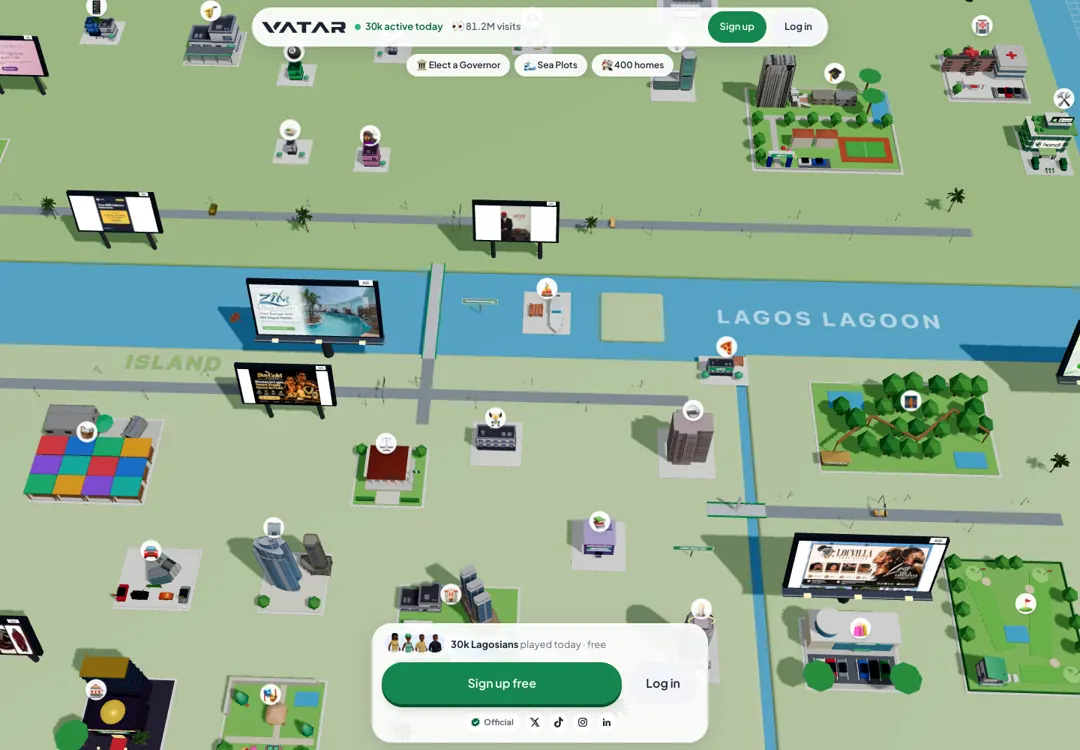
Open the official game and you can see the city from above before signing in. Lagos Lagoon separates streets on the map, and venues have their own markers. CcHub, Amala Shitta and Freedom Park are places you can look for when you’re getting your bearings.
The public screen also shows entries for the governor election, sea plots and housing. You can use the map to pick a first landmark before you create a character. Once you’re in, check the jobs and venues your character can actually use.
Where to find key screens in the gameplay recording
These timestamps are from KKC Games’ gameplay recording. Start with the Laptop Desk to see the at-home options, or jump to Amala Shitta and the map for venue actions and the in-game phone.
How danfo fits into your day
A danfo is a Lagos minibus. In Vatar’s world it serves as transport, and driving one can also earn money. Use the map to compare available routes and check the fare against walking. If you want to drive one for work, check the role and current pay in the game’s job listings.
Our test drive through the first taxi level
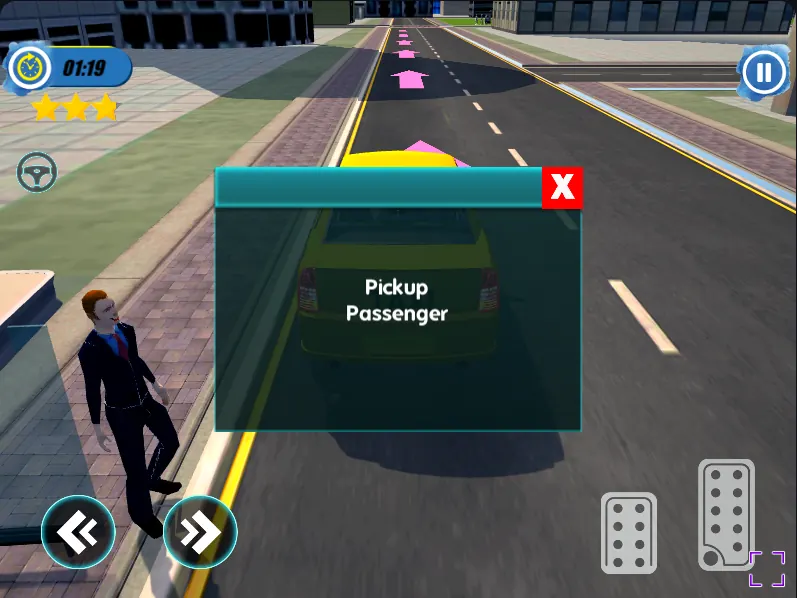
City Taxi Driving Simulator loads in the player on Browser Game Hub. In the game menu, choose Play Now, select Level 1 and hit Start on the vehicle screen. Our first level began with roughly 90 seconds on the clock. The timer is in the top-left corner, and arrows on the road lead you to the passenger.
We pressed W to pull forward and got the Pickup Passenger prompt beside the curb. Once we dismissed it and picked up the passenger, green arrows marked the route ahead. Ease off the accelerator when the next arrow points into a turn, then use A or D to steer. That gives you room to make the turn before you drive past it.

How Vatar’s Lagos Life compares with two city simulation games
Try the taxi game for a timed passenger run, or start taking orders in the restaurant game to focus on running a business.

City Taxi Driving Simulator
Both have city driving. Driving a danfo earns income in Vatar’s shared world. The taxi game turns one pickup and drop-off into a timed level with arrows on the road.
Drive a taxi
Dream Restaurant Tycoon
Both let you put earnings back into a business. Lagos Life offers several occupations and venues. This game focuses on taking orders, serving food and buying more tables.
Run a restaurant
How we checked this guide
We captured the Lagos Life map before signing in and checked the work and phone screens in KKC Games’ recording. We captured the taxi screenshots while driving the opening section of Level 1 in the Browser Game Hub player.
Frequently asked questions
Where can I play the official Lagos Life game?
Open lagoslife.app in a browser and use Vatar’s sign-up or sign-in screen.
Is Lagos Life free on phones and computers?
Vatar offers free browser play and optional purchases. You can begin from its website without installing an app.
Can I see the map without signing in?
Yes. The public page shows Lagos Lagoon and venue markers. Sign in to create a Sim, work or meet other players.
How do I get my first job?
Open Phone → Jobs, choose a role you qualify for and apply. Check its start date and schedule, then use Go to work on a workday.
Why is Go to work missing?
Check your start day, today’s schedule, the game clock and whether you already completed a shift.
When is rent due in Vatar’s Lagos Life?
The housing guide lists Saturday at 9 a.m., with a 24-hour grace period for a new life. Your home card shows the rent amount.
Can Game Naira be withdrawn?
Game Naira is virtual currency. Vatar says it cannot be withdrawn or exchanged for real money.
Can I play with friends?
Yes. Meet at a shared landmark, message other players or join a crew in Vatar’s multiplayer world.












Find another game to play
Explore more racing, puzzle, and sports games, or pick one at random.


