
- Developer
- AleksV02
- Devices
- Desktop, phone and tablet
- Category
- Simulation
- On Browser Game Hub
- Play here
The player loads automatically on this page. The provider controls the in-game menu and any ads shown in the player.
Game overview
Once the view reaches the work site, follow the wooden walkway with W. The pile marked 24 bricks sits under the yellow arrow. The opening prompt sends those bricks to glowing slots on the structure.
Watch gameplay
Find the 24-brick pile in Pyramid Builders
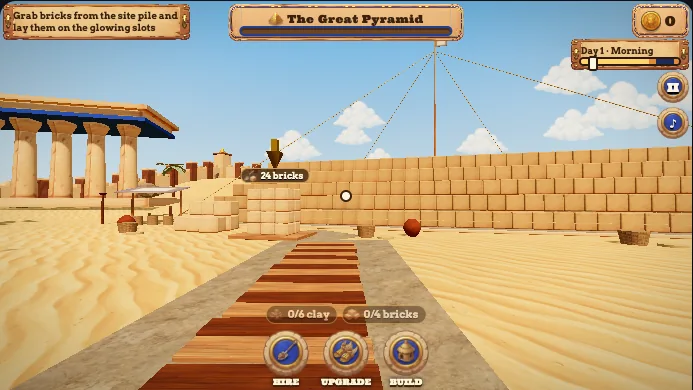
The instruction says to grab bricks from the site pile and lay them on glowing slots. Take the walkway after the flyover
Let the intro finish and resume if it pauses. When the first-person view appears, hold W along the planks.
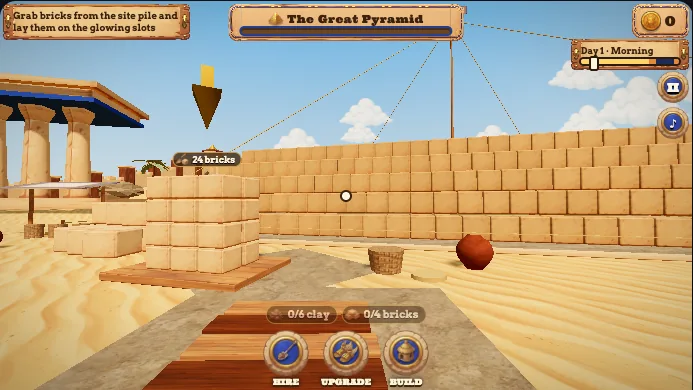
The pile contains 24, while the carried brick counter is 0/4. Locate the stockpile under the arrow
Keep W held until the 24 bricks label is readable on the left. Read the carried amount at the bottom before starting work.
Use the yellow arrow to find the supply pile and the bottom counter to check whether you picked anything up.
Read the pile and carried-brick counters
Start with the bricks the site gives you
The Great Pyramid opens with a wooden approach and a wall across the view. The tutorial points to a site pile for the first bricks. Follow the planks with W and look for the yellow arrow over the stack. As you approach, read 24 bricks on the pile and 0/4 bricks at the bottom. The first number is the supply at the site. The second is the load you're carrying.
More construction and gathering games

Frequently asked questions
What do I aim at after reaching the pile?
Face the marked pile and use the work control. Then use the opening prompt to find the glowing slots on the structure.
The control guide lists hold left mouse to work. Watch the bottom brick counter on your first pick-up attempt. At the wall, use the same display to see whether a placement consumed a brick. The desktop test reached the pile without picking up or laying a brick.
What if I have clay but the wall asks for bricks?
Use the mould and drying rack first. The game's production guide says the site needs dry bricks.
This initial pile lets you identify the placement route before learning production. Later, when dry bricks wait at the rack, check transport and placement before making more clay. If only the raw clay is piling up, look at the mould and drying step.
How can I keep the pile and the placement target in sight?
Look for the yellow arrow when approaching the brick pile, then face the wall and find the glowing slots. The crosshair is the small white circle in the middle.
Walk the route once without carrying anything. From the wooden planks, turn to the pile on the left and remember where the planks meet the sand. That gives you a reference for stepping back to the wall without searching the entire work site. The 0/6 clay and 0/4 bricks gauges show two different kinds of carried material.
When would a worker or a transport upgrade save more time?
Watch where a full stack is waiting. If there are dry bricks at a rack, hire or equip the leg that takes them toward the wall. If the crew is waiting for dry bricks, work on production.
The handbook describes trolleys for moving material, catapults for lifting bricks higher and the rally horn for hurrying workers. The day indicator starts at Day 1 · Morning. To see if a change helps, compare how much material moves during a similar work period. The Alien Pact is listed as the option that lets work continue into the night.
What does the rally horn do?
Use it when you want the crew to hurry. Catapults serve another purpose by carrying bricks up toward the structure.
Can construction keep going at night?
The Alien Pact changes the night shift so building can continue.








Find another game to play
Explore more racing, puzzle, and sports games, or pick one at random.


