
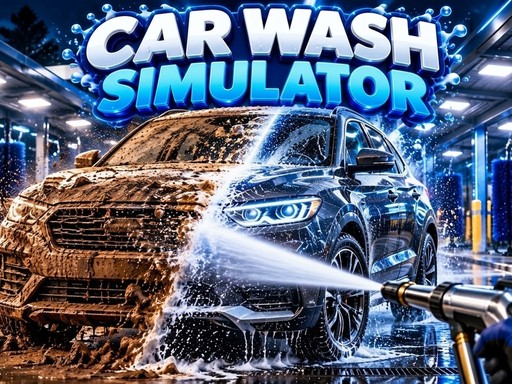
- Developer
- splitch studio
- Devices
- Desktop, phone and tablet
- Category
- Simulation
- On Browser Game Hub
- Play here
The player loads automatically on this page. The provider controls the in-game menu and any ads shown in the player.
Game overview
Click the CLICK TO PLAY panel after the opening break. The tutorial points to the Bay 1 terminal and E. The first job card shows a Compact Hatchback with Light Dust, marked Waiting, at 0% overall.
Watch gameplay
Find Bay 1 and read the first wash order
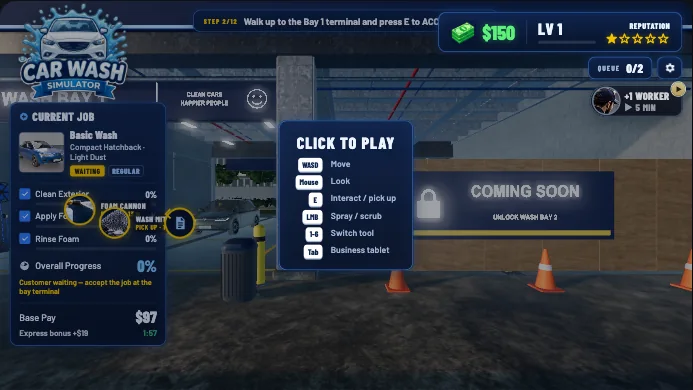
The first job is a Basic Wash for a Compact Hatchback with Light Dust. Click to take control of the garage
The overlay lists WASD to move, mouse to look and E for interaction. Click inside the game to get past it.
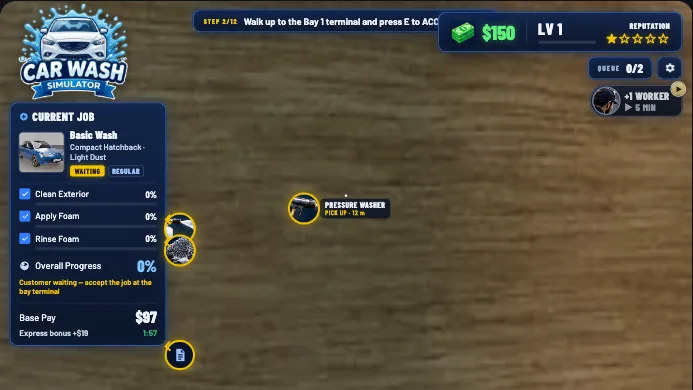
The first job panel still says Waiting and Overall Progress 0%. Find the terminal cue and distinguish tool markers
W moved us forward until the wall filled the view and the Pressure Washer marker moved closer. Turn to reorient and look for the Bay 1 terminal named in the tutorial.
If the wall fills your view, stop walking and move the mouse to find the bay entrance. Follow the terminal prompt before fetching tools.
Take the first job in the garage
Start at the terminal, then find the tools
After the opening break the overlay lists the controls. Click it and look at the strip at the top. It sends you to the Bay 1 terminal to press E. At the same time, the job card describes Basic Wash and shows Waiting. Those two labels tell you where to start. The distance on a tool marker describes where the tool is in the garage.
Other shop-management games

Frequently asked questions
I walked forward and only see a wall. How do I get back to Bay 1?
Stop holding W and use the mouse to turn until you can see along the open bay. Follow the terminal cue rather than walking toward the closest equipment icon.
The second shot was taken with the wall filling the view. It helped confirm movement and the change in equipment distance. Once you're lined up with the terminal, use the game prompt to accept the job and see whether Waiting changes.
Which progress indicator should I follow during a wash?
Check the current checklist item and match the tool to that task. The starting job panel includes Clean Exterior, Apply Foam and Rinse Foam.
The control panel lists 1–6 to switch tools, left mouse to spray or scrub, and Tab for the tablet. If a percentage stalls, look at the other side and lower panels of the hatchback with the correct tool selected. The desktop run verified garage movement, without accepting or completing a job.
Which parts of the order card tell me what to do first?
Read the yellow status line before the checklist percentages. Customer waiting – accept the job at the bay terminal sits under the 0% progress display.
Basic Wash describes the package and Light Dust describes the vehicle's condition. The tool icons can overlap the order card when you are near the wall. Look for the order status at the left and the terminal instruction on top, then enter the bay, use E and recheck the status before spraying.
What should I do with the $150 at the start?
Work through the initial bay before choosing an improvement. The captured HUD shows $150 at Level 1, a $97 base pay on the first order and a separate express bonus timer.
Those numbers describe different things. The starting cash is your balance. The pay and timer belong to the displayed order and are not earnings from the test. After completing your own washes, use Tab to see whether a tool, another bay or help would remove the delay you run into most often.
How do I choose a different tool?
Use keys 1 through 6 on a keyboard. On a phone, use the tool buttons inside the game.
Where are the management controls?
Press Tab to open the business tablet. Use it when you want to review or change the business side of the wash.
I have sprayed over the car. Why isn't the task finished?
Check the job checklist. You may have missed a panel or need a different tool for the current step.
Can I hire someone instead of doing all the washing myself?
Hiring staff is part of the business progression. The money you make can also go into your equipment and additional wash bays.





Find another game to play
Explore more racing, puzzle, and sports games, or pick one at random.


