

- Developer
- Blodisgo
- Devices
- Desktop, phone and tablet
- Category
- Sports
- On Browser Game Hub
- Play here
The player loads automatically on this page. The provider controls the in-game menu and any ads shown in the player.
Game overview
In a desktop match against the computer, D took our left-side player toward the net. W lifted the player with both hands above the tape.
Watch gameplay
Move toward the net before jumping in Volley Clash
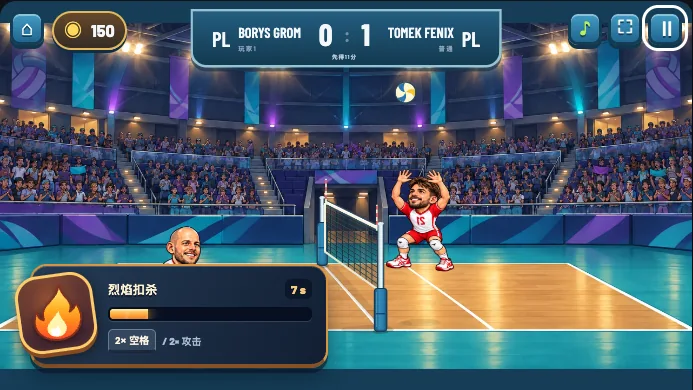
Use the net as a reference before changing position. Start a computer match and find the ball
Choose the CPU opponent. If the built-in pause screen opens after switching tabs, hit Continue Game. Locate your side, the net and the ball in the air.
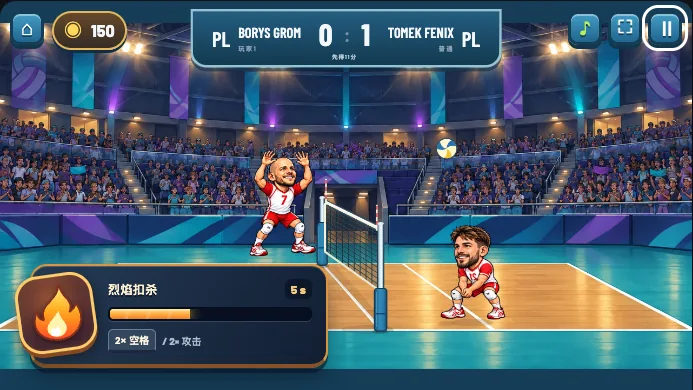
This shot verifies the approach and jump. It does not show a hit. Hold D, then press W near the net
On the left side, D moves toward the net. Stop beside it and press W. In the photo the left player’s hands are up at the net while the CPU is on the right.
Look at which side of the net the ball is coming down on. Move there before committing to a jump.
Position for the next return
Leave enough room for a ball behind you
The jump in the second photo happened just to the left of the net. A near-net jump can help with a short ball. For one headed deeper, start moving with A from that side before using W. Watch the feet of your player against the court line. Once you land and play moves away from the net, come back toward a position from which you can reach both short and deep balls.
The game gives Player 1 Space for a regular hit. Player 2 uses the arrows and Enter on the same keyboard. Try moving into the likely falling path first, then pressing W and a single hit as the ball enters reach. The test verified the jump and the changing Fire Attack meter.
More games for reading a ball in flight


Frequently asked questions
When should I double-tap for Fire Attack?
Wait for Fire Attack to charge, then double-tap the hit key when the ball is in reach.
The publisher specifies an eight-second cooldown. The meter was counting down during the tested rally, so use an ordinary hit while it recovers. For a ball already behind your player, move first and save the charged hit for a ball you can reach.
How can I tell which player jumped in the pictures?
Use the net to separate the two halves. Our D and W inputs were for the left-side player.
In the first photo, the computer player on the right was already moving under the ball. In the second, the left-side player has both hands up next to the tape and the right-side player is down. In your next rally, establish where your player is at rest and watch that side for the W input. Check the ball and score afterward if you are testing for a return.
How do two people play on the same keyboard?
Choose local two-player. Player 1 uses A and D, W and Space. Player 2 uses arrows and Enter.
Try one left-right movement and a jump per player before serving. If one player is near the net on the right, use the right-side arrow assignments rather than mirroring the left side’s letters. The publisher lists five AI difficulties and a separate sixteen-player tournament. Our desktop match was against the computer, so the shared key assignments follow the game’s documentation.
Is the 16-player tournament the same as local multiplayer?
The publisher describes a 16-player tournament and separately documents local head-to-head for two people on one device.
How many volleyball characters can I unlock?
The publisher lists 18 unlockable characters whose stats can be upgraded.







Find another game to play
Explore more racing, puzzle, and sports games, or pick one at random.

