
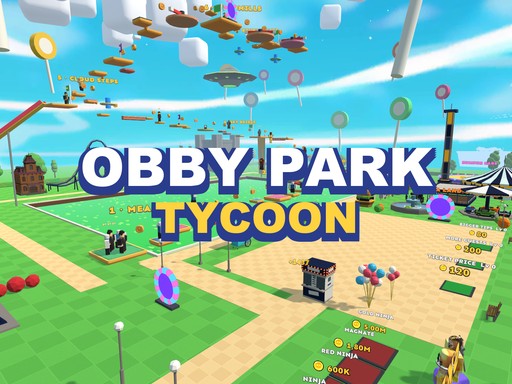
- Developer
- Nextin prod
- Devices
- Desktop, phone and tablet
- Category
- Simulation
- On Browser Game Hub
- Play here
The player loads automatically on this page. The provider controls the in-game menu and any ads shown in the player.
Game overview
Walk onto the green FREE Park Gate pad using W and A. A path opens and the next pad reads Balloon Cart 20. The game tells you guests are paying and counts what you still need.
Watch gameplay
Build the free Park Gate and find the Balloon Cart
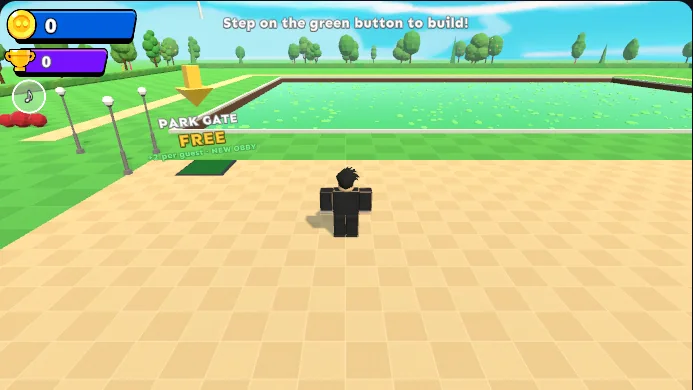
The money and trophy counters both begin at 0. Walk directly onto FREE Park Gate
From the opening plaza, use W and A in short holds to go toward the green pad by the slime lake, then step onto the pad.
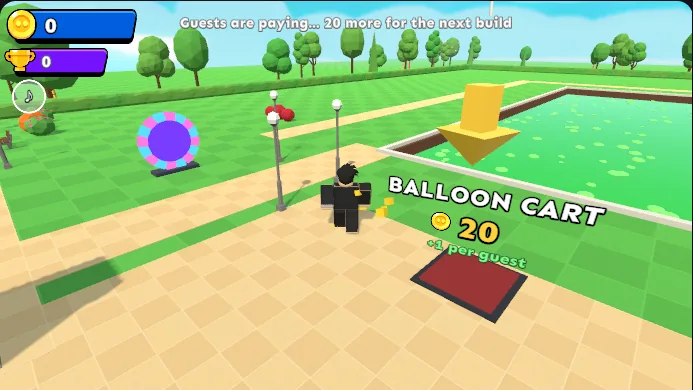
The banner says 20 more for the next build. Read the price of the next attraction
After the gate builds, watch for Guests are paying… and Balloon Cart 20 on the next pad. The pad was red at 0 coins.
Stand on the coloured pad itself. The big arrow identifies the attraction, and the coin counter tells you whether you can buy it.
Read prices and test-run pads
Step on the pad under the big arrow
The character starts across the plaza from the green Park Gate button. Walk diagonally with W and A, then use either key on its own to line up with the button. In our run the gate opened after a final short push forward at the pad. The banner changed and the red Balloon Cart appeared at 20.
More games about opening a business

Frequently asked questions
Why is the Balloon Cart pad red after the gate opens?
Compare the 20 on the pad with your coin balance. The opening gate is free and the next attraction has a price.
The screenshot after construction still shows 0 coins and the banner says 20 more. Watch for the left coin counter to reach the price before attempting the paid build. This test opened the free gate only.
Do I have to jump through each new attraction?
The game guide gives TEST RUN to a new obstacle section. Complete that section before visitors can use it.
For your first test run, use the mouse to turn the camera toward the next landing and Space to jump. Watch one cycle of a moving platform or spinning bar before leaving a safe edge. The opening gate and its follow-on stall use the build pads shown in the screenshots.
If I'm next to FREE and nothing happens, how can I line up?
Release the diagonal input and use one direction at a time. Place the character's feet on the small green square beneath the label.
The gate arrow and text are large enough to read from the plaza, but the purchase square occupies a much smaller patch. In the test the first diagonal move brought us alongside it. A separate W moved onto it and changed the banner. Use that change and the appearance of the next pad to confirm the build.
What new control does the camera add on the obstacle course?
Drag to turn the camera and scroll to change distance. Pick a landing angle first, then use Space for the jump.
Looking straight along a series of platforms can hide their gaps. Turn the camera enough to see the near and far edges. On a spinning bar, watch a full pass across the take-off spot. Later options in the published game include giant summit coins and a Fun Zone with Ball Toss and Bumper Cars.
How can I find the big bonus coins?
Play the course yourself and check its summit. The publisher places giant coins at the tops of routes.
What do I press for a boost in Bumper Cars?
Steer with WASD and use Space to boost in Bumper Cars. In the main obstacle course, Space is Jump.
How do I access Lava Land?
Look for the portal to the second world. Lava Land is separate from the main park course.




Find another game to play
Explore more racing, puzzle, and sports games, or pick one at random.


