

- Developer
- RedToks
- Devices
- Desktop, phone and tablet
- Category
- Action
- On Browser Game Hub
- Play here
The player loads automatically on this page. The provider controls the in-game menu and any ads shown in the player.
Game overview
Follow the center path to the yellow strip and time one click in the green part of the vertical meter. A desktop attempt showed GREAT and +16 POWER after release.
Watch gameplay
Read the opening Throw Food timing meter
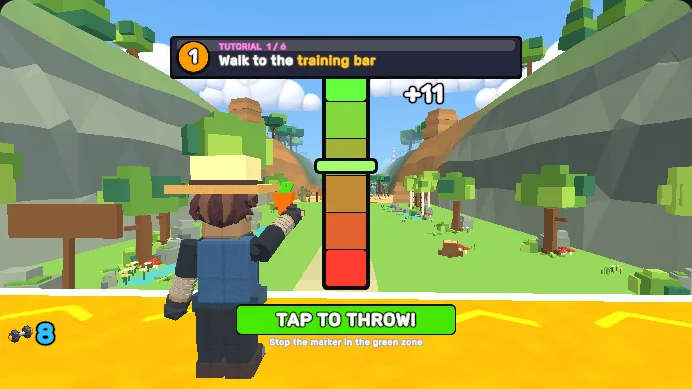
The floating number in this frame is visible while the meter is still open. Walk to the yellow training strip
Hold W along the middle path. Step onto the yellow training area and look for the vertical colored bar and TAP TO THROW button. The moving marker shows when to click.
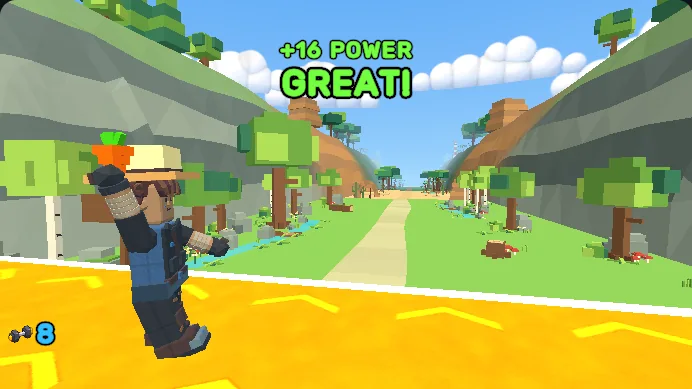
This is the confirmed result of the timed input. Stop the marker in the green area
Click TAP TO THROW as the marker reaches green. Check the message above the character. The test displayed GREAT and +16 POWER.
Choose one green segment and watch a full sweep to see how the marker approaches it. Read the reward after the click, while the number is still visible.
Improve the timing before changing equipment
Compare the meter with the result over your character
W gets you along the center path. Once the colored bar and TAP TO THROW appear, take your eyes off the path and follow the marker for a full pass. Use the moving marker to decide when to click. Then look up for the result. In the tested attempt the text read GREAT and +16 POWER. The yellow-strip check did not cover the later animal collection or unlocks.
More single-input timing games
Frequently asked questions
Why do the two screenshots show +11 and +16?
The +11 appears while the meter is on screen. The +16 POWER and GREAT text appear after the timed click and are the feedback to record.
On a retry, wait for your chosen green segment to approach and click once. If your hand keeps reacting after the marker has passed the segment, watch a full pass and use the preceding color boundary as your cue on the next pass. Compare the feedback from separate attempts before drawing a conclusion about your timing.
If a throw keeps reaching the same part of the map, what do I change first?
Change either your power or your food upgrade and compare throws under otherwise similar conditions.
The distributor describes training power and upgrading food as separate ways to progress. Read the result of the next throw after making one change. When comparing distance, use the same throwing area and jot down where the food comes down before opening the animal result. The collected animals can earn coins according to the game description.
Why does Space jump in one place and throw in another?
Outside the throwing action, Space jumps. In throwing mode it is also a documented throw input. Check the current prompt before pressing it.
Use W along the center path in the opening. E is the listed interaction key for objects. If the tutorial directs you to a pull-up bar, go to the indicated object and follow its task. For the checked yellow-strip sequence, the on-screen button read TAP TO THROW and the click worked. Treat the label as the cue for which action you are in.
What should I record after food lands?
Note where it landed and which animal appeared. The publisher says animals in the collection earn coins.
If you want to compare two food upgrades, use the same launch point and check the result before moving on to the next throw. Hold right mouse and drag to look around, or use the wheel to change the zoom if you lost the landing area. The screenshots capture only the opening timing attempt, so they give a way to compare the power feedback without establishing a particular animal reward.





Find another game to play
Explore more racing, puzzle, and sports games, or pick one at random.


