
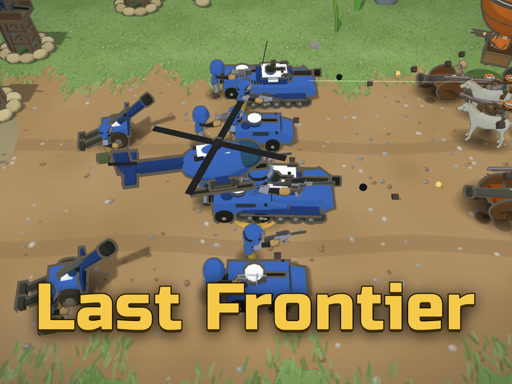
- Developer
- Neriell Games
- Devices
- Desktop, phone and tablet
- Category
- Action
- On Browser Game Hub
- Play here
The player loads automatically on this page. The provider controls the in-game menu and any ads shown in the player.
Game overview
Mission 1 opens with a choice between income and production. In the desktop Field mission, an 80-coin Bank changed income from 2 to 4 coins per second. The wave timer sits beside the income rate at the top.
Watch gameplay
Build your first Bank in Last Frontier
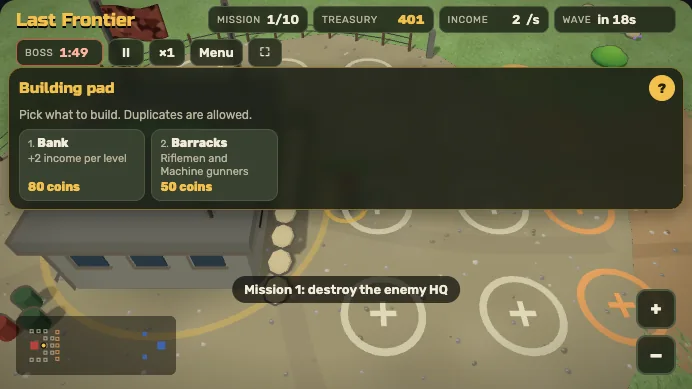
The Bank card lists two income per level. Read the building pad choices
Choose New game, Campaign, then Field mission 1 and Start game. Click a visible plus pad. This pad offered Bank for 80 coins and Barracks for 50. Read the wave timer across the top before choosing.
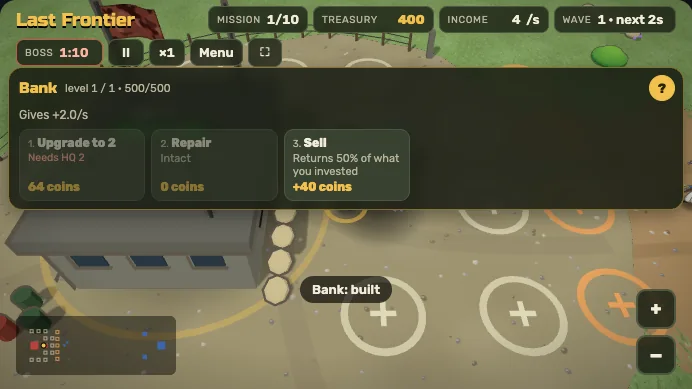
The confirmation and the rate tell you what was built. Check the income rate after buying
Select Bank and watch for Bank: built on the map. Then check INCOME at the top. It showed 4/s, up from 2/s before construction.
Read Wave and Treasury before buying. Base income can rise while you choose, so compare the income rate to verify the Bank and use Treasury to decide what you can buy now.
Budget for the first wave
What an 80-coin opening buys
The first Field build pad offered a Bank for 80 coins and a Barracks for 50. The Treasury figures in the two pictures are 401 and 400 at different points in the mission. Use the card price for cost and INCOME for the change in rate. The Bank increased passive income immediately in this run. After it was built, its panel showed Upgrade, Repair, and Sell. Check the rate at the top before opening another pad. This run verified a Bank purchase, without reaching the end of the wave.
Two different ways to defend a position
Frequently asked questions
How do I compare an 80-coin Bank and a 50-coin Barracks?
Build the Bank for income if you have time before contact and can still afford defense. Pick production when putting units on the field is the immediate problem.
Check where you expect contact before spending. In Mission 1 the HUD gives you a wave timer and a minimap you can use to check where the commander is. The test confirmed the Bank's income bonus. A Bank opening still needs a plan for the route enemies take and a follow-up purchase you can afford when they arrive.
How can I tell if the extra income is saving enough time?
Read INCOME before and after buying. The opening rate was 2/s and one Bank added 2/s.
At that rate the Bank adds 20 extra coins in ten seconds, and its 80-coin cost corresponds to 40 seconds of extra income at a constant rate. Use the comparison as a rough budget. If the timer leaves only a few seconds, decide what you can afford immediately and what can wait for a later wave.
The Bank is built. Where do I go to upgrade it?
Move the commander onto the pad of the existing Bank. The published controls use WASD or the arrow keys on desktop and a joystick on touch.
Use the building panel to confirm you are at the Bank before choosing Upgrade. The second image shows the menu for the level-one Bank, including Upgrade to 2, Repair and Sell. Upgrade to 2 shows Needs HQ 2 and 64 coins. Sell shows a 40-coin return. An unused plus pad takes you back to construction choices. Our screenshots verified the first Bank and its income, with no purchase of an upgrade.
How do I practice a better build order without switching factions?
Repeat the same Field mission and compare the time of your first Bank and first defensive build. Keep the same faction while you change the order.
Note where pressure first reaches your side. Try a tower when the same approach keeps opening, or a Barracks or Factory when you need units to support a different lane. The commander's special ability has its own game button. Campaign is the chapter route. Survival keeps sending waves and adds bosses, so a setup that survives the opener still needs follow-up purchases.
What happens after the early waves in Survival?
Enemy waves grow more demanding and bosses enter the fight. Keep improving the base after it can handle the opening attacks.
What are medals for in Last Frontier?
They unlock more factions, harder settings and permanent upgrades.
Do the same units come with every faction?
The official game describes each faction as having its own commander, units and buildings, so check the available options after switching.








Find another game to play
Explore more racing, puzzle, and sports games, or pick one at random.


