

- Developer
- Mapi Games
- Devices
- Desktop, phone and tablet
- Category
- Racing
- On Browser Game Hub
- Play here
The player loads automatically on this page. The provider controls the in-game menu and any ads shown in the player.
Game overview
Open Play → World Circuit → Race Stage 01. In lap two we scraped the outside tyres at 20 km/h. Space brought up BOOST!, a blue trail and a 72 km/h reading.
Watch gameplay
Use the nitro gauge on Park Circuit
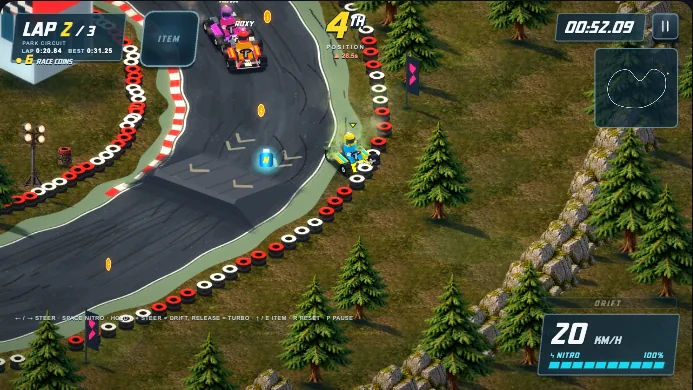
The separate nitro gauge is visible under speed. Find the speed drop on the outside
After entering Park Circuit, resume the race if it paused. On lap two, holding Left in the bend took us along the outer tyres. The speed read 20 km/h.
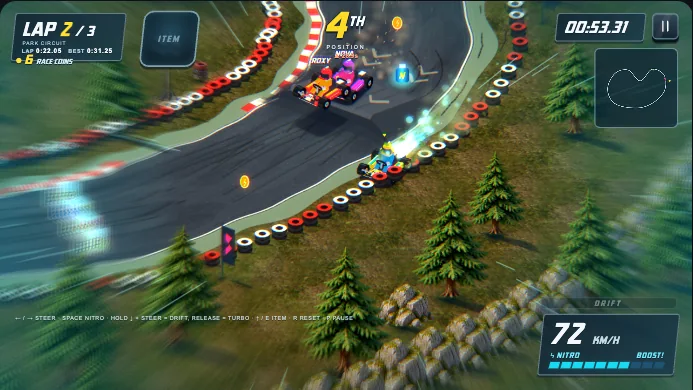
The visible boost and speed change confirm the nitro input. Press Space and read BOOST!
With the blue kart still beside the barrier, Space produced a blue trail. Look for BOOST! and the new speed reading.
After you touch a barrier, bring the kart back toward the lane before trying Space at the exit.
Read the nitro and item displays
Look at the direction of the blue trail
Park Circuit is seen from above and behind. In our second lap we scraped the outside tyres in a turn and dropped to 20 km/h. Space produced a blue trail and a 72 km/h reading. The kart was still close to the outside, so that capture shows nitro working at the edge. For a clean exit, set the kart facing along the lane first.
Other item kart races

Frequently asked questions
Do I use Up or Space for the box item?
The control guide lists Up or E for a held item and Space for nitro. Read the ITEM slot before pressing the item key.
The slot in our two pictures is empty. The lit blue shape farther up the lane is on the course, while the nitro bars sit below the speed readout. Look at those two HUD locations before you spend either resource. The test confirmed Space and a speed change, with no pickup used.
How can I stop scrubbing speed at the same tyres?
Turn earlier and compare where the kart passes the outside row. Adjust the first steering input before trying a boost.
The guide lists Down with a direction for drifting. If you want to compare a drift and an ordinary turn, leave the kart and track the same. Compare whether you can exit facing the next straight before reaching for Space.
How can I reproduce the nitro check without hitting the outside rail?
Use the first stretch where you can see straight pavement beyond the corner. Wait until the kart points down it, note the speed, and press Space once.
Compare the blue bars at the lower right, BOOST!, the trail behind the kart and the new speed. We saw a large change in a slow corner, so use your own before-and-after reading on the straight. In a crowded race, pick a gap that stays clear long enough to use the boost before the next turn arrives.
Should I take the inside or go wide for the question box?
Use the box that fits the line you are already driving. Before crossing for one, check that you can still turn for the next bend without running into the tyre wall.
The publisher lists rockets, oil, bombs and a thunder attack. Think about where a rival is before using the item. When you want to practise the steering alone, use Time Trial and compare your line against the ghost at the outside tyres. Eliminator instead asks you to stay ahead of the rear of the field.
Can I practice a stage against a ghost?
Yes. Open Time Trial to compare a run against its ghost.
Which items can come out of the question boxes?
The publisher lists rockets, oil, bombs and a thunder attack among the race items.
What can I spend coins on?
Bring coins to the garage to buy faster karts.





Find another game to play
Explore more racing, puzzle, and sports games, or pick one at random.

