

- Developer
- Satisfying Games Co
- Devices
- Desktop, phone and tablet
- Category
- Arcade
- On Browser Game Hub
- Play here
The player loads automatically on this page. The provider controls the in-game menu and any ads shown in the player.
Game overview
Move the mouse ahead of the snake to steer. In the desktop round, changing the pointer's direction curved the red-and-yellow snake, leaving an open pink trail outside its starting area.
Watch gameplay
Steer out and read your exposed trail in Snake vs AI

Learn the starting border while there is still room to pick a direction. Find the starting circle at READY?
Locate the small safe-start countdown and the 2-minute match clock. Once the snake starts moving, guide its head toward the edge of its circle with the pointer.
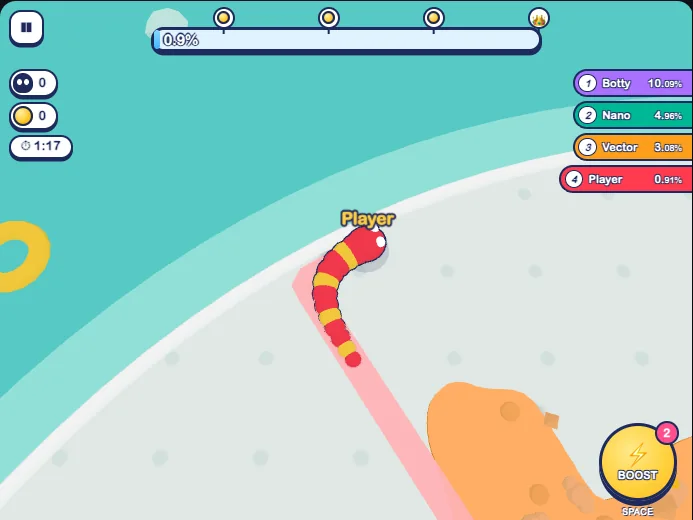
Follow the head to steer and the line to see what remains exposed. Turn the head and look behind it
Move the pointer from one side of the head to the other. The snake curves, and the pink line outside home records where you have been.
Pick where you will come back before crossing your border. Start close to your own color so a turn home takes little time.
Plan a short return across your own border
An open trail during the round
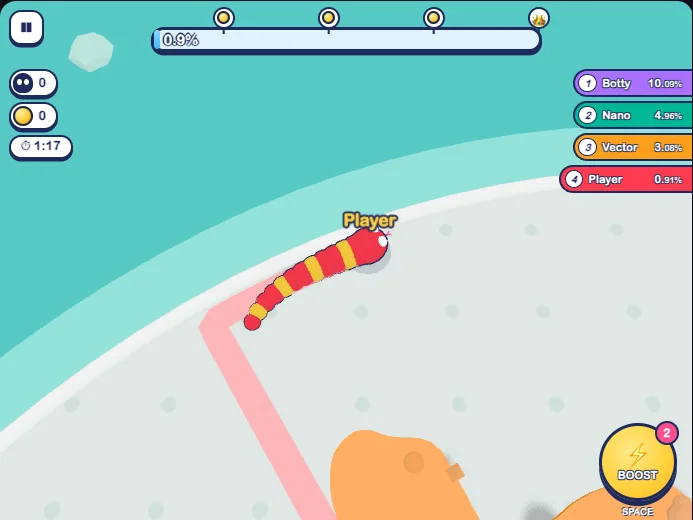
The desktop run verified steering and trail visibility.
Leave room to turn back
In the starting image, your land is a pink circle. The open route later appears as a thinner pink line behind the head. According to the game rules, you claim the enclosed ground by returning to your own color. Start with a loop that follows the outside of that circle and bends home at a nearby point. Look for a filled patch to confirm the claim. The screenshots show the line before any capture.
More short rounds with ground to claim

Frequently asked questions
How do I shorten a run if an AI snake approaches?
Turn toward the nearest reachable part of your border. Shorten the exposed trail's remaining time before trying to take more space.
The danger is where a rival can cross the line you already drew. Check both the direction of the other snake and the corner of your own line. If it is heading toward that corner, a nearby return is a better first attempt than extending the loop.
Which counter tells me how the match is going?
The clock is on the left and the standings are on the right. The documented result uses territory at time expiry, with an early win for claiming half the island.
Why does one pink region look solid and the other look like a line?
The solid area is your territory. The thin line shows the path the snake has drawn while outside it.
Start along one end of the border and turn back toward the other before you go far. Check that the head crosses the edge of your own color, then look between the line and the old border for the filled area that signals a successful claim. If you still see a thin open line, you are still out on the loop.
Which other steering inputs can I try?
The documented desktop options include WASD and the arrow keys. On phones, the game guide lists dragging.
The opening test used mouse movement. With the keyboard, try a single turn near your own circle and compare the new head direction with the first section of the trail. The opponents in this version are AI. If one is already approaching, practice your turn inside the starter area first.
How do I unlock Unlimited mode?
Reach Elite rank. The publisher describes Unlimited as a mode without a timer.
What can I use if my open trail keeps getting cut?
The game offers a trail shield. Smaller loops near home also reduce the time your trail is exposed.








Find another game to play
Explore more racing, puzzle, and sports games, or pick one at random.


