
- Developer
- orosulagames
- Devices
- Desktop keyboard
- Category
- Trivia
- On Browser Game Hub
- Play here
The player loads automatically on this page. The provider controls the in-game menu and any ads shown in the player.
Game overview
Read the United States prompt above the globe. Hold the left mouse button and drag. The desktop run moved Asia and the Indian Ocean across the center while the target prompt stayed the same.
Watch gameplay
Rotate the globe toward the United States in Find On Earth
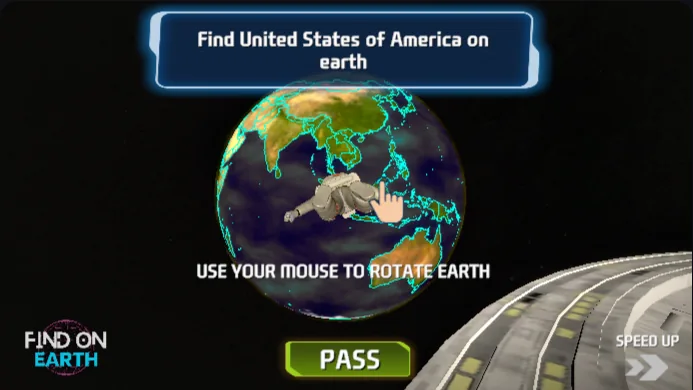
Use the prompt as your target while the view changes. Read the target above the globe
The prompt asks for the United States of America while the visible half includes Asia. Press inside the globe and drag to bring a different coastline into view.
Rotate until you recognize the continent, then use smaller movements to distinguish the target country from neighboring borders.
Use coastlines to guide a smaller drag
From Asia, recognize a coast across the ocean
The opening screenshot shows the goal text but the visible side includes Asia. The next desktop image shows the Indian Ocean, which confirms that dragging changed the center of the view. To look for the United States, keep rotating until North America comes into sight. Use the broad Pacific coast and the positions of Canada and Mexico to narrow to the mainland. Try a small drag first after finding a coast so you can keep it on screen.
Compare continents before and after a drag
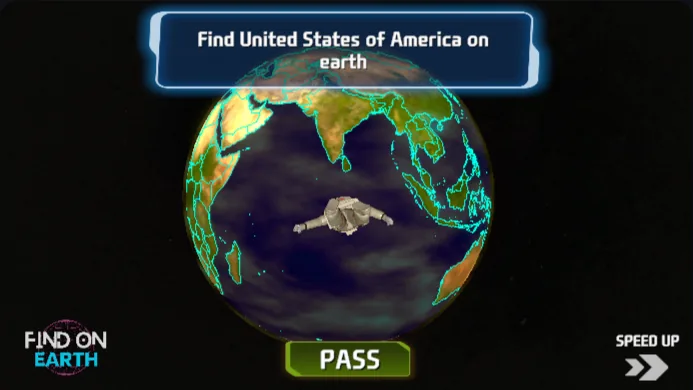
The changed geography shows the rotation worked.
More ways to review countries
Frequently asked questions
How do I tell whether drag input is working?
Compare a coast or island with the center of the globe before and after the drag. The country prompt can stay on screen while the globe moves.
Try one short left-button drag inside the globe. If the coastline moves toward the rim, decide from that movement whether to continue or reverse your next drag. The desktop test confirms rotation. We did not observe a submitted correct answer.
How can a larger neighbor help me find a small country?
Locate a coast, peninsula, or larger neighbor first, then follow its border or shoreline with short movements.
Keep the landmark in view while checking which side the target should be on. Approach the intended country under the publisher's flight instructions, and watch for a result or new prompt.
Where are the controls if I get stuck on the first question?
Start with the on-screen mouse prompt. PASS and SPEED UP are visible on the displayed interface.
In the desktop capture PASS is below the globe. Check the question first if you want to skip it. The publisher describes mouse play for this edition.
How do I avoid spinning past a country after I find its continent?
Make the next drag shorter. Watch one coastal feature approach the middle of the globe before adjusting again.
For the opening United States prompt, a broad drag can help you reach the Pacific side of North America. Once the outline looks familiar, pick a recognizable bend in the coast and make one small drag at a time. If the prompt is unchanged while the globe moves, keep using the country name to guide the next adjustment.
Does Find On Earth show answer choices in a list?
You respond by navigating to a country on the globe. Look for its region from the question, then move toward the specific spot.







Find another game to play
Explore more racing, puzzle, and sports games, or pick one at random.


